Many modern PHP applications and commercial scripts require the ionCube Loader extension to function correctly. This essential component decodes encrypted PHP files at runtime, allowing developers to protect their source code. If you need to run such software, you must enable ionCube Loader in your hosting environment. This guide provides a clear, step-by-step process to activate it using the CloudLinux Selector feature within your DirectAdmin control panel.
Table of Contents
What is ionCube Loader?
The ionCube Loader is a PHP extension that processes and executes files that have been protected with the ionCube Encoder. Developers use the encoder to safeguard their PHP code from being viewed or altered, which is a common practice for commercial software, themes, and plugins. Without the loader enabled on your server, any attempt to run these encrypted PHP files will result in an error, preventing the application from working.
How to Enable ionCube Loader in DirectAdmin
Activating the ionCube Loader is a straightforward process within the DirectAdmin interface, thanks to the integrated CloudLinux PHP Selector. Follow these simple steps to get your protected applications running smoothly.
- Log in to DirectAdmin
First, access your DirectAdmin control panel using your provided credentials. - Navigate to the PHP Selector
In the main dashboard, find the Extra Features section. Click the Select PHP version icon. Alternatively, you can type “Select PHP” into the navigation filter box at the top to quickly locate the option, then click on it.
- Access the Extensions Tab
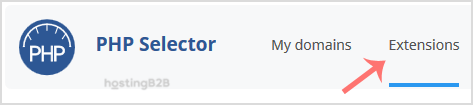
Once the PHP Selector interface loads, you will see several tabs. Click on the Extensions tab to view a list of all available PHP modules for your selected PHP version.
Note you may see an error on this page if your account is using the server’s native PHP version. To proceed, you must first change PHP version via CloudLinux selector to a non-native option. - Enable the ioncube_loader Extension
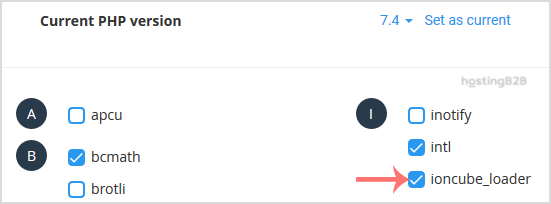
Scroll through the list of extensions or use your browser’s search function to find ioncube_loader. Check the box next to its name. The system will automatically save your change and display a success message confirming that the module has been enabled.

Verify Your ionCube Loader Installation
After enabling the extension, it is wise to confirm it is active for your website. The most reliable way to do this is by creating a PHP info file. Create a new file named `phpinfo.php` in your website’s public directory and add the following line of code to it “. Save the file and then access it in your web browser by visiting `yourdomain.com/phpinfo.php`. On the resulting page, search for “ionCube”. If it appears, the installation was successful. Remember to delete this file after you are done for security reasons.

Troubleshooting Common Issues
If your application still reports that ionCube Loader is missing after you have enabled it, the most common issue is a mismatch between the PHP version selected in CloudLinux and the version your website is configured to use. Ensure that the PHP version where you enabled the extension is the same one your site is actively running. You can also manage other PHP extensions in DirectAdmin using the same interface to ensure all your application’s requirements are met. For more complex software, you may find that scalable VPS hosting provides the flexibility you need.
Frequently Asked Questions
Here are answers to some common questions about managing the ionCube Loader extension.
ionCube Loader is a free PHP extension required to run PHP files that have been protected and encoded with the ionCube Encoder. It is commonly needed for commercial WordPress plugins, themes, and other third-party PHP applications.
The “Select PHP Version” feature is part of CloudLinux OS. If this option is missing from your DirectAdmin panel, it likely means your hosting server does not run CloudLinux. Please contact our support team to discuss your options.
No, a restart is not necessary. The CloudLinux PHP Selector applies the change immediately. As soon as you see the success message, the extension is active and ready for use.
Yes. The CloudLinux Selector allows you to manage extensions on a per-version basis. Simply choose the desired PHP version from the dropdown menu at the top of the page before navigating to the Extensions tab.
Yes, the process is very similar for cPanel users. You can follow our dedicated guide to enable ionCube loader in cPanel for specific instructions.